Pipedrive 이 페이지에서
Pipedrive is a sales pipeline CRM designed to help small businesses manage leads, track sales activities and close more deals.
For more information about the API, see the Pipedrive REST API .
See the
Schema section for a list of objects available for replication.
기능 스냅샷 유용한 링크와 지원되는 기능을 포함하여 이 커넥터에 대한 전반적인 내용을 살펴보겠습니다.
특징/기능 지원 세부 정보 지원되는 Qlik Talend Data Integration 프로젝트 복제 프로젝트 에만 해당됩니다. 데이터 파이프라인 프로젝트는 지원되지 않습니다.대상 업데이트 방법
복제 작업:
데이터 레이크 작업에 데이터 랜딩:
메타데이터 관리
수동 메타데이터 생성이 필요하지 않습니다. 스키마 진화
열 데이터 유형 변경 작업만 지원됩니다. LOB 열(NCLOB, CLOB 및 BLOB) 복제 지원되지 않음. 예정된 CDC 필수. 이렇게 하면 소스의 변경 내용이 대상에 최신 상태로 유지됩니다.
복제 작업의 경우 복제 작업을 위한 CDC 스케줄링
레이크 랜딩 작업의 경우 레이크 랜딩 작업을 위한 CDC 일정
알림 부분적으로 지원됨
작업 변경 알림 설정
모니터링 중 CDC에만 해당되며, 이 커넥터의 경우 전체 로드가 적용되지 않습니다.
개별 데이터 작업 모니터링
JSON 열 페이로드의 자동 압축 해제 지원되지 않음. 소스 데이터 집합의 JSON 열 페이로드는 대상에서 자동으로 압축 해제되지 않습니다.
Preparing for authentication To access your data, you need to authenticate the connection with your account credentials.
정보 메모 사용하는 계정에 가져오려는 테이블에 대한 읽기 액세스 권한이 있는지 확인합니다.
To obtain the API token:
Make sure you have the Admin permissions in Pipedrive .
You need them to ensure Qlik can access and replicate all your data. It is recommend that you create a separate Pipedrive Admin user for Qlik , but this is not mandatory to use the integration. Creating a dedicated user makes the activities easier to distinguish in logs and audits.
If you do not want to create a dedicated user, make sure that the credentials you use to connect to Qlik have Admin permissions. If the API token associated with a non-Admin user is used to set up the integration, Qlik may be unable to access and replicate all of your data.
Users are counted at the account-level in Pipedrive , not the company level. If you want to create a user for Qlik and are concerned about the cost of your Pipedrive subscription, you will not be charged twice.
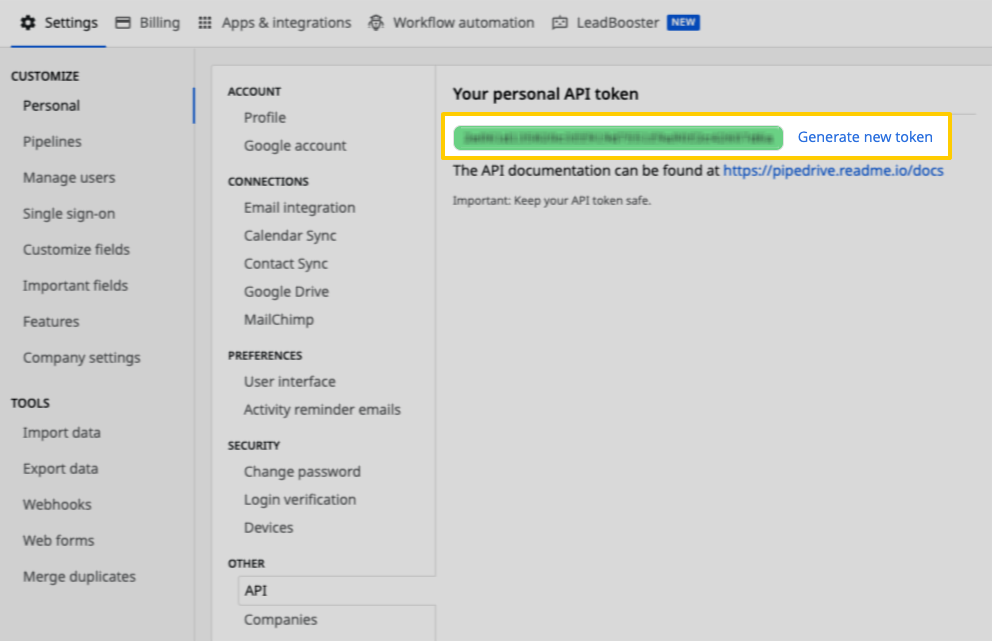
If you created a Pipedrive user for Qlik , log into Pipedrive as the Qlik user. If you did not, log into Pipedrive as an Admin user. Click the user menu (where your avatar is) in the top-right corner of the screen. Click Settings > API . Copy the API token:
Connecting multiple Pipedrive companies
If you want to connect more than one Pipedrive company, repeat the entire procedure above for every company you want to add. You must create a separate Pipedrive integration for each company.
Our Pipedrive integration uses an API Token to authenticate. Pipedrive API tokens are unique not only at the user level, but the company level as well. This means that a user’s API Token will vary from company to company, even if everything is housed in the same Pipedrive account.
Creating the connection 자세한 내용은 SaaS 응용 프로그램에 연결
필요한 연결 속성을 입력합니다. 연결 이름 에 연결 이름을 입력합니다.
연결이 만들어질 때 연결에 대한 메타데이터를 정의하려면 연결 메타데이터 열기 를 선택합니다.
만들기 를 클릭합니다.
Connection settings Setting Description Data gateway
사용 사례에 필요한 경우 Data Movement gateway 를 선택합니다.
정보 메모 이 필드는 Data Movement gateway 를 지원하지 않으므로 Qlik Talend Cloud 시작 구독에서는 사용할 수 없습니다. 다른 구독 계층이 있고 Data Movement gateway 를 사용하지 않으려면 없음 을 선택합니다.
Data Movement gateway 의 이점과 이를 필요로 하는 사용 사례에 대한 자세한 내용은 Qlik Data Gateway - Data Movement
Start Date 데이터를 소스에서 대상으로 복제해야 하는 날짜를 MM/DD/YYYY 형식으로 입력합니다.
API Token API token.
정보 메모 Schemas and naming conventions can change from version to version. It is recommended to verify your version before continuing.
The schema and info displayed below is for version 1.
Depending on your destination, table and column names may not appear as they are outlined below.
activities
The activities table contains info about recent activities - calls, tasks, lunches, etc. - recorded in your Pipedrive account.
activities table foreign keys Join activities with on deals activities.id = deals.last_activity_id activities.id = deals.next_activity_id activities.deal_id = deals.id activities.org_id = deals.org_id activities.assigned_to_user_id = deals.creator_user_id activities.created_by_user_id = deals.creator_user_id activities.user_id = deals.creator_user_id activities.assigned_to_user_id = deals.user_id activities.created_by_user_id = deals.user_id activities.user_id = deals.user_id files activities.id = files.activity_id activities.deal_id = files.deal_id activities.org_id = files.org_id activities.participants.person_id = files.person_id activities.person_id = files.person_id activities.assigned_to_user_id = files.user_id activities.created_by_user_id = files.user_id activities.user_id = files.user_id organizations activities.id = organizations.last_activity_id activities.id = organizations.next_activity_id activities.org_id = organizations.id persons activities.id = persons.last_activity_id activities.id = persons.next_activity_id activities.participants.person_id = persons.id activities.person_id = persons.id deal_products activities.deal_id = deal_products.deal_id notes activities.deal_id = notes.deal_id activities.org_id = notes.org_id activities.participants.person_id = notes.person_id activities.person_id = notes.person_id activities.assigned_to_user_id = notes.last_update_user_id activities.created_by_user_id = notes.last_update_user_id activities.user_id = notes.last_update_user_id activities.assigned_to_user_id = notes.user_id activities.created_by_user_id = notes.user_id activities.user_id = notes.user_id dealflow activities.assigned_to_user_id = dealflow.user_id activities.created_by_user_id = dealflow.user_id activities.user_id = dealflow.user_id filters activities.assigned_to_user_id = filters.user_id activities.created_by_user_id = filters.user_id activities.user_id = filters.user_id users activities.assigned_to_user_id = users.id activities.created_by_user_id = users.id activities.user_id = users.id
activities table schema
active_flag
BOOLEAN
add_time
DATE-TIME
assigned_to_user_id
INTEGER
company_id
INTEGER
created_by_user_id
INTEGER
deal_dropbox_bcc
STRING
deal_id
INTEGER
deal_title
STRING
done
BOOLEAN
due_date
STRING
due_time
STRING
duration
STRING
gcal_event_id
STRING
google_calendar_etag
STRING
google_calendar_id
STRING
id
INTEGER
marked_as_done_time
DATE-TIME
note
STRING
org_id
INTEGER
org_name
STRING
owner_name
STRING
participants
ARRAY
This is a nested data structure:
person_id : INTEGERprimary_flag : BOOLEAN
person_dropbox_bcc
STRING
person_id
INTEGER
person_name
STRING
reference_id
INTEGER
reference_type
STRING
subject
STRING
type
STRING
update_time
DATE-TIME
user_id
INTEGER
activity_types
The activity_types table contains info about the different kinds of activities in your Pipedrive account.
activity_types table schema
active_flag
BOOLEAN
add_time
DATE-TIME
color
STRING
icon_key
STRING
id
INTEGER
is_custom_flag
BOOLEAN
key_string
STRING
name
STRING
order_nr
INTEGER
update_time
DATE-TIME
currency
The currency table contains info about the currencies listed in your Pipedrive account.
currency table schema
active_flag
BOOLEAN
code
STRING
decimal_points
INTEGER
id
INTEGER
is_custom_flag
BOOLEAN
name
STRING
symbol
STRING
deal_fields
The deal_fields table contains info about all deal fields.
deal_fields table schema
active_flag
BOOLEAN
add_time
DATE-TIME
add_visible_flag
BOOLEAN
bulk_edit_allowed
BOOLEAN
details_visible_flag
BOOLEAN
edit_flag
BOOLEAN
field_type
STRING
filtering_allowed
BOOLEAN
id
INTEGER
important_flag
BOOLEAN
index_visible_flag
BOOLEAN
key
STRING
last_updated_by_user_id
INTEGER
mandatory_flag
BOOLEAN
name
STRING
options
ARRAY
This is a nested data structure:
order_nr
INTEGER
searchable_flag
BOOLEAN
sortable_flag
BOOLEAN
update_time
DATE-TIME
deal_products
The deal_products table contains info about the products attached to deals.
deal_products table foreign keys Join deal_products with on activities deal_products.deal_id = activities.deal_id deals deal_products.deal_id = deals.id files deal_products.deal_id = files.deal_id deal_products.product_id = files.product_id notes deal_products.deal_id = notes.deal_id products deal_products.product_id = products.id
deal_products table schema
active_flag
BOOLEAN
add_time
DATE-TIME
comments
STRING
currency
STRING
deal_id
INTEGER
discount_percentage
NUMBER
duration
NUMBER
enabled_flag
BOOLEAN
id
INTEGER
item_price
NUMBER
last_edit
DATE-TIME
name
STRING
order_nr
INTEGER
product_id
INTEGER
product_variation_id
INTEGER
quantity
INTEGER
quantity_formatted
STRING
sum
NUMBER
sum_formatted
STRING
sum_no_discount
NUMBER
dealflow
The dealflow table contains info about the updates made to a deal.
dealflow table foreign keys Join dealflow with on activities dealflow.user_id = activities.assigned_to_user_id dealflow.user_id = activities.created_by_user_id dealflow.user_id = activities.user_id deals dealflow.user_id = deals.creator_user_id dealflow.user_id = deals.user_id files dealflow.user_id = files.user_id filters dealflow.user_id = filters.user_id notes dealflow.user_id = notes.last_update_user_id dealflow.user_id = notes.user_id users dealflow.user_id = users.id
dealflow table schema
additional_data
STRING
change_source
STRING
field_key
STRING
id
INTEGER
is_bulk_update_flag
BOOLEAN
item_id
INTEGER
log_time
DATE-TIME
new_value
STRING
old_value
STRING
user_id
INTEGER
deals
The deals table contains info about updates made recently to the deals in your Pipedrive account.
deals table foreign keys Join deals with on activities deals.last_activity_id = activities.id deals.next_activity_id = activities.id deals.id = activities.deal_id deals.org_id = activities.org_id deals.creator_user_id = activities.assigned_to_user_id deals.user_id = activities.assigned_to_user_id deals.creator_user_id = activities.created_by_user_id deals.user_id = activities.created_by_user_id deals.creator_user_id = activities.user_id deals.user_id = activities.user_id files deals.last_activity_id = files.activity_id deals.next_activity_id = files.activity_id deals.id = files.deal_id deals.org_id = files.org_id deals.creator_user_id = files.user_id deals.user_id = files.user_id organizations deals.last_activity_id = organizations.last_activity_id deals.next_activity_id = organizations.last_activity_id deals.last_activity_id = organizations.next_activity_id deals.next_activity_id = organizations.next_activity_id deals.org_id = organizations.id persons deals.last_activity_id = persons.last_activity_id deals.next_activity_id = persons.last_activity_id deals.last_activity_id = persons.next_activity_id deals.next_activity_id = persons.next_activity_id deal_products deals.id = deal_products.deal_id notes deals.id = notes.deal_id deals.org_id = notes.org_id deals.creator_user_id = notes.last_update_user_id deals.user_id = notes.last_update_user_id deals.creator_user_id = notes.user_id deals.user_id = notes.user_id pipelines deals.pipeline_id = pipelines.id stages deals.pipeline_id = stages.pipeline_id deals.stage_id = stages.id dealflow deals.creator_user_id = dealflow.user_id deals.user_id = dealflow.user_id filters deals.creator_user_id = filters.user_id deals.user_id = filters.user_id users deals.creator_user_id = users.id deals.user_id = users.id
deals table schema
active
BOOLEAN
activities_count
INTEGER
add_time
DATE-TIME
cc_email
STRING
close_time
DATE-TIME
creator_user_id
INTEGER
currency
STRING
deleted
BOOLEAN
done_activities_count
INTEGER
email_messages_count
INTEGER
expected_close_date
STRING
files_count
INTEGER
first_won_time
DATE-TIME
STRING
followers_count
INTEGER
formatted_value
STRING
formatted_weighted_value
STRING
group_id
INTEGER
group_name
STRING
id
INTEGER
last_activity_date
STRING
last_activity_id
INTEGER
last_incoming_mail_time
DATE-TIME
last_outgoing_mail_time
DATE-TIME
lost_reason
STRING
lost_time
DATE-TIME
next_activity_date
STRING
next_activity_duration
STRING
next_activity_id
INTEGER
next_activity_note
STRING
next_activity_subject
STRING
next_activity_time
STRING
next_activity_type
STRING
notes_count
INTEGER
org_hidden
BOOLEAN
org_id
INTEGER
org_name
STRING
owner_name
STRING
participants_count
INTEGER
person_hidden
BOOLEAN
person_id
INTEGER
person_name
STRING
pipeline_id
INTEGER
probability
NUMBER
products_count
INTEGER
reference_activities_count
INTEGER
renewal_type
STRING
rotten_time
DATE-TIME
stage_change_time
DATE-TIME
stage_id
INTEGER
stage_order_nr
INTEGER
status
STRING
title
STRING
undone_activities_count
INTEGER
update_time
DATE-TIME
user_id
INTEGER
value
NUMBER
visible_to
STRING
weighted_value
NUMBER
won_time
DATE-TIME
files
The files table contains info about the recently updated files in your Pipedrive account.
files table foreign keys Join files with on activities files.activity_id = activities.id files.deal_id = activities.deal_id files.org_id = activities.org_id files.person_id = activities.participants.person_id files.person_id = activities.person_id files.user_id = activities.assigned_to_user_id files.user_id = activities.created_by_user_id files.user_id = activities.user_id deals files.activity_id = deals.last_activity_id files.activity_id = deals.next_activity_id files.deal_id = deals.id files.org_id = deals.org_id files.user_id = deals.creator_user_id files.user_id = deals.user_id organizations files.activity_id = organizations.last_activity_id files.activity_id = organizations.next_activity_id files.org_id = organizations.id persons files.activity_id = persons.last_activity_id files.activity_id = persons.next_activity_id files.person_id = persons.id deal_products files.deal_id = deal_products.deal_id files.product_id = deal_products.product_id notes files.deal_id = notes.deal_id files.note_id = notes.id files.org_id = notes.org_id files.person_id = notes.person_id files.user_id = notes.last_update_user_id files.user_id = notes.user_id products files.product_id = products.id dealflow files.user_id = dealflow.user_id filters files.user_id = filters.user_id users files.user_id = users.id
files table schema
active_flag
BOOLEAN
activity_id
INTEGER
add_time
DATE-TIME
cid
STRING
deal_id
INTEGER
deal_name
STRING
description
STRING
email_message_id
INTEGER
file_name
STRING
file_size
INTEGER
file_type
STRING
id
INTEGER
inline_flag
BOOLEAN
log_id
INTEGER
mail_message_id
INTEGER
name
STRING
note_id
INTEGER
org_id
INTEGER
org_name
STRING
people_name
STRING
person_id
INTEGER
person_name
STRING
product_id
INTEGER
product_name
STRING
remote_id
STRING
remote_location
STRING
s3_bucket
STRING
update_time
DATE-TIME
url
STRING
user_id
INTEGER
filters
The filters table contains info about the filters, or data validation conditions, used in your Pipedrive account.
filters table foreign keys Join filters with on activities filters.user_id = activities.assigned_to_user_id filters.user_id = activities.created_by_user_id filters.user_id = activities.user_id dealflow filters.user_id = dealflow.user_id deals filters.user_id = deals.creator_user_id filters.user_id = deals.user_id files filters.user_id = files.user_id notes filters.user_id = notes.last_update_user_id filters.user_id = notes.user_id users filters.user_id = users.id
filters table schema
active_flag
BOOLEAN
add_time
DATE-TIME
custom_view_id
INTEGER
id
INTEGER
name
STRING
temporary_flag
BOOLEAN
type
STRING
update_time
DATE-TIME
user_id
INTEGER
visible_to
STRING
notes
The notes table contains info about recent notes in your Pipedrive account. Notes are pieces of textual (HTML-formatted) information that can be attached to dealspersonsorganizations
notes table foreign keys Join notes with on activities notes.deal_id = activities.deal_id notes.org_id = activities.org_id notes.person_id = activities.participants.person_id notes.person_id = activities.person_id notes.last_update_user_id = activities.assigned_to_user_id notes.user_id = activities.assigned_to_user_id notes.last_update_user_id = activities.created_by_user_id notes.user_id = activities.created_by_user_id notes.last_update_user_id = activities.user_id notes.user_id = activities.user_id deals notes.deal_id = deals.id notes.org_id = deals.org_id notes.last_update_user_id = deals.creator_user_id notes.user_id = deals.creator_user_id notes.last_update_user_id = deals.user_id notes.user_id = deals.user_id deal_products notes.deal_id = deal_products.deal_id files notes.deal_id = files.deal_id notes.id = files.note_id notes.org_id = files.org_id notes.person_id = files.person_id notes.last_update_user_id = files.user_id notes.user_id = files.user_id organizations notes.org_id = organizations.id persons notes.person_id = persons.id dealflow notes.last_update_user_id = dealflow.user_id notes.user_id = dealflow.user_id filters notes.last_update_user_id = filters.user_id notes.user_id = filters.user_id users notes.last_update_user_id = users.id notes.user_id = users.id
notes table schema
active_flag
BOOLEAN
add_time
DATE-TIME
content
STRING
deal
OBJECT
This is a nested data structure: title , STRING.
deal_id
INTEGER
id
INTEGER
last_update_user_id
INTEGER
org_id
INTEGER
organization
OBJECT
This is a nested data structure: name , STRING.
person
OBJECT
This is a nested data structure: name , STRING.
person_id
INTEGER
pinned_to_deal_flag
BOOLEAN
pinned_to_organization_flag
BOOLEAN
pinned_to_person_flag
BOOLEAN
update_time
DATE-TIME
user
OBJECT
This is a nested data structure:
email : STRINGicon_url : STRINGis_you : BOOLEANname : STRING
user_id
INTEGER
organizations
The organizations table contains info about the recent organizations in your Pipedrive account. Organizations are companies and other types of organizations you are making deals with.
organizations table foreign keys Join organizations with on activities organizations.last_activity_id = activities.id organizations.next_activity_id = activities.id organizations.id = activities.org_id deals organizations.last_activity_id = deals.last_activity_id organizations.next_activity_id = deals.last_activity_id organizations.last_activity_id = deals.next_activity_id organizations.next_activity_id = deals.next_activity_id organizations.id = deals.org_id files organizations.last_activity_id = files.activity_id organizations.next_activity_id = files.activity_id organizations.id = files.org_id persons organizations.last_activity_id = persons.last_activity_id organizations.next_activity_id = persons.last_activity_id organizations.last_activity_id = persons.next_activity_id organizations.next_activity_id = persons.next_activity_id notes organizations.id = notes.org_id
organizations table schema
active_flag
BOOLEAN
activities_count
INTEGER
add_time
DATE-TIME
address
STRING
address_admin_area_level_1
STRING
address_admin_area_level_2
STRING
address_country
STRING
address_formatted_address
STRING
address_locality
STRING
address_postal_code
STRING
address_route
STRING
address_street_number
STRING
address_sublocality
STRING
address_subpremise
STRING
category_id
INTEGER
cc_email
STRING
closed_deals_count
INTEGER
company_id
INTEGER
country_code
STRING
done_activities_count
INTEGER
email_messages_count
INTEGER
files_count
INTEGER
first_char
STRING
followers_count
INTEGER
id
INTEGER
last_activity_date
STRING
last_activity_id
INTEGER
lost_deals_count
INTEGER
name
STRING
next_activity_date
STRING
next_activity_id
INTEGER
next_activity_time
STRING
notes_count
INTEGER
open_deals_count
INTEGER
owner_id
INTEGER
owner_name
STRING
people_count
INTEGER
picture_id
INTEGER
reference_activities_count
INTEGER
related_closed_deals_count
INTEGER
related_lost_deals_count
INTEGER
related_open_deals_count
INTEGER
related_won_deals_count
INTEGER
timeline_last_activity_time
DATE-TIME
timeline_last_activity_time_by_owner
DATE-TIME
undone_activities_count
INTEGER
update_time
DATE-TIME
visible_to
STRING
won_deals_count
INTEGER
persons
The persons table contains info about the recent persons in your Pipedrive account. In Pipedrive, a person represents a contact, or a customer you’re doing a deal with.
persons table foreign keys Join persons with on activities persons.last_activity_id = activities.id persons.next_activity_id = activities.id persons.id = activities.participants.person_id persons.id = activities.person_id deals persons.last_activity_id = deals.last_activity_id persons.next_activity_id = deals.last_activity_id persons.last_activity_id = deals.next_activity_id persons.next_activity_id = deals.next_activity_id files persons.last_activity_id = files.activity_id persons.next_activity_id = files.activity_id persons.id = files.person_id organizations persons.last_activity_id = organizations.last_activity_id persons.next_activity_id = organizations.last_activity_id persons.last_activity_id = organizations.next_activity_id persons.next_activity_id = organizations.next_activity_id notes persons.id = notes.person_id
persons table schema
active_flag
BOOLEAN
activities_count
INTEGER
add_time
DATE-TIME
cc_email
STRING
closed_deals_count
INTEGER
company_id
INTEGER
done_activities_count
INTEGER
email
ARRAY
This is a nested data structure:
label : STRINGprimary : BOOLEANvalue : STRING
email_messages_count
INTEGER
files_count
INTEGER
first_char
STRING
first_name
STRING
followers_count
INTEGER
id
INTEGER
last_activity_date
STRING
last_activity_id
INTEGER
last_incoming_mail_time
DATE-TIME
last_name
STRING
last_outgoing_mail_time
DATE-TIME
lost_deals_count
INTEGER
name
STRING
next_activity_date
STRING
next_activity_id
INTEGER
next_activity_time
STRING
notes_count
INTEGER
open_deals_count
INTEGER
org_id
INTEGER
org_name
STRING
owner_id
INTEGER
owner_name
STRING
participant_closed_deals_count
INTEGER
participant_open_deals_count
INTEGER
phone
ARRAY
This is a nested data structure:
label : STRINGprimary : BOOLEANvalue : STRING
picture_id
INTEGER
reference_activities_count
INTEGER
related_closed_deals_count
INTEGER
related_lost_deals_count
INTEGER
related_open_deals_count
INTEGER
related_won_deals_count
INTEGER
timeline_last_activity_time
DATE-TIME
timeline_last_activity_time_by_owner
DATE-TIME
undone_activities_count
INTEGER
update_time
DATE-TIME
visible_to
STRING
won_deals_count
INTEGER
pipelines
The pipelines table contains info about the pipelines in your Pipedrive account.
pipelines table foreign keys Join pipelines with on deals pipelines.id = deals.pipeline_id stages pipelines.id = stages.pipeline_id
pipelines table schema
active
BOOLEAN
add_time
DATE-TIME
id
INTEGER
name
STRING
order_nr
INTEGER
selected
BOOLEAN
update_time
DATE-TIME
url_title
STRING
products
The products table contains info about the recent products in your Pipedrive account.
products table foreign keys Join products with on deal_products products.id = deal_products.product_id files products.id = files.product_id
products table schema
active_flag
BOOLEAN
add_time
DATE-TIME
code
STRING
files_count
INTEGER
first_char
STRING
followers_count
INTEGER
id
INTEGER
name
STRING
owner_id
INTEGER
owner_name
STRING
prices
OBJECT, ARRAY
This is a nested data structure: USD , OBJECT, which is also a nested data structure.
cost : NUMBERcurrency : STRINGid : INTEGERoverhead_cost : NUMBERprice : INTEGERproduct_id : INTEGER
selectable
BOOLEAN
tax
INTEGER
unit
STRING
update_time
DATE-TIME
visible_to
STRING
stages
The stages table contains info about the pipeline stages in your Pipedrive account.
stages table foreign keys Join stages with on deals stages.pipeline_id = deals.pipeline_id stages.id = deals.stage_id pipelines stages.pipeline_id = pipelines.id
stages table schema
active_flag
BOOLEAN
add_time
DATE-TIME
deal_probability
INTEGER
id
INTEGER
name
STRING
order_nr
INTEGER
pipeline_id
INTEGER
pipeline_name
STRING
rotten_days
INTEGER
rotten_flag
BOOLEAN
update_time
DATE-TIME
users
The users table contains info about the users associated with your Pipedrive account. Note : This table contains info about the people with access to your Pipedrive account - they should not be confused with persons
users table foreign keys Join users with on activities users.id = activities.assigned_to_user_id users.id = activities.created_by_user_id users.id = activities.user_id dealflow users.id = dealflow.user_id deals users.id = deals.creator_user_id users.id = deals.user_id files users.id = files.user_id filters users.id = filters.user_id notes users.id = notes.last_update_user_id users.id = notes.user_id
users table schema
activated
BOOLEAN
active_flag
BOOLEAN
created
DATE-TIME
default_currency
STRING
email
STRING
has_created_company
BOOLEAN
icon_url
STRING
id
INTEGER
is_admin
INTEGER
is_you
BOOLEAN
lang
INTEGER
last_login
DATE-TIME
STRING
locale
STRING
modified
DATE-TIME
name
STRING
phone
STRING
role_id
INTEGER
signup_flow_variation
STRING
timezone_name
STRING
timezone_offset
STRING