
Avro consumers API
Qlik Talend Data Integration supports writing messages to Kafka-based endpoints both in JSON format and in Apache Avro format. While JSON format is very easy to read, it is also rather verbose and slow to process. Apache Avro format, on the other hand, is extremely compact and can be processed very fast. However, using Avro for streaming presents a challenge in that Avro messages cannot be interpreted without the schema with which they were created. Moreover, Avro messages are usually encapsulated in a special "envelope" that points the processing agent to the correct schema for interpreting the message.
The advantages of Avro format over other plain formats such as JSON can be summed up as follows:
- More efficient in serialization space consumption
- Relatively easy to consume programatically
- Supports long term schema evolution, which is important with data schemas that are likely to change over time
To ease the task of processing Avro messages, Qlik provides the Qlik Avro Message Decoder SDK, which contains the following:
- Avro message deserializer
- Message schema integration hooks
- Working samples
All Qlik message types covered in this section are encapsulated in a single message schema called the Qlik envelope. The schema of the Qlik envelope is as following:
{
"type":"record",
"name":"MessageEnvelope",
"fields":[
{"name":"magic","type":{"type":"fixed","name":"Magic","size":5}},
{"name":"type","type":"string"},
{"name":"headers","type":["null",{"type":"map","values":"string"}]},
{"name":"messageSchemaId","type":["null","string"]},
{"name":"messageSchema","type":["null","string"]},
{"name":"message","type":"bytes"}
]
}
The fields in the envelope are as follows:
-
magic (5 bytes fixed field)
The constant "atMSG" is used to identify this form of message. The "atMSG" constant should be used to validate that this message is indeed a Qlik envelope message.
-
type (string field)
Describes the enveloped message type. This can be one of two values: MD which stands for metadata message and DT which stands for data message.
-
headers (map of string key and value)
A free for use map for various properties set at the application level. Currently, no headers are set by Qlik Talend Data Integration but this may change in future versions.
-
messageSchemaId (null or string)
A reference to a schema defined elsewhere, which can be used to deserialize the bytes in the message field. This specification does not explain how the schema ID is used for looking up the actual schema - it is an application level detail. This field is used exclusively with the messageSchema field.
-
messageSchema (null or string)
An embedded UTF-8 encoded Avro JSON schema with which the message field can be serialized. This field is used exclusively with the messageSchemaId field.
-
message (bytes)
An Avro encoded message, which is the payload of the message envelope.
Given the envelope schema, it is possible for anyone using this schema to properly decode the envelope messages from Kafka.
Once the envelope message has been decoded, there are two possible scenarios:
- Scenario 1: Decoding a self-describing message such as the metadata message
- Scenario 2: Decoding a message by referenced schema ID such as data messages
The method for logically decoding messages in both scenarios is described below.
Decoding a self-describing message
When the messageSchema field is not null, it means the message field can be decoded using the schema included in the messageSchema field. This is fairly straightforward to perform programatically since the only thing you need to usually supply Avro is a schema and a message, both of which are provided in the envelope message.
The Qlik Talend Data Integration metadata messages which include both table metadata, lineage and data schema description (to be referenced later by data messages) are enveloped in the self-describing envelope.
Decoding a message by referenced schema ID
Avro schemas are JSON documents which can be quite large, usually much larger than the data encoded by Avro conforming to the schema. For example, a schema of a 10 column table could be a JSON document of more than 100 characters while an actual row encoding of 10 columns may be only 10 bytes (depending of course on the type and length of fields). It is therefore typically not recommended to include schema and data together in a Kafka message because the schema information is redundant and is the same for all data messages while the actual data is the only thing which differs between data messages.
To avoid sending schema with each data message, each schema has a 32 bytes long ID. When a data message based on a previously sent data message schema (via the metadata message) is constructed, the messageSchema field is set to null and the messageSchemaId field is set to the 32 bytes ID of the schema instead. The application responsibility is to locate the data schema sent earlier in the metadata message and use that schema to decode the data message contained in the message field.
Typical consumer logic
A typical scenario involving Kafka involves Qlik Talend Data Integration as the Producer of messages into Kafka and customer code as the Consumer. Qlik Talend Data Integration offers the ability to define a specific topic as the schema topic and different topics for the table data.
The customer's consumer code should read metadata messages from the schema topic and then save the data schemas and any other information the consumer wishes to access later in a customer defined zone. Another set of customer consumers should read data messages from the various data topics, and access the data schemas zone as required to retrieve the data schemas required for decoding the data messages.
When consuming data messages and metadata messages from several topics and partitions in a multi-thread/process manner, a situation may arise where a given consumer may attempt to read a data message before the corresponding metadata message has been read. As it is not possible to read a data message before its corresponding metadata message, the consumer's logic should wait a reasonable amount of time until the corresponding metadata message has been read. If the metadata message is still not available after waiting for a reasonable amount of time, the consumer should handle this as an unexpected error and activate the planned error policy. An example of such a policy could be saving the message in a dedicated “delayed” topic for later processing.
As a rule of thumb, the number of metadata messages will be much lower (in the magnitude of 1:10000 or more) than the number of data messages. So, assuming a metadata consumer is active, the gap between metadata message and data message should be no more than a few seconds (usually, milliseconds).
Classes and Methods
To facilitate development (by the customer consumer developer(s)), Qlik provides a JAVA SDK packed as JAR for decoding its messages. The SDK is mainly built around the following classes/interfaces:
public interface MetadataStore { byte[] loadMetadata(String schemaId);void saveMetadata(String schemaId, byte[] data);
}This interface needs to be implemented by a customer class. Since the SDK cannot "guess" the behavior of the customer's code, the customer needs to supply a class implementing this interface.
The loadMetadata method locates data schemas (metadata) based on their ID.
The saveMetadata method stores the data schemas.
AttunityMessageDecoder
This class is used to decode messages read from Kafka:
public AttunityMessageDecoder(MetadataStore metadataStoreImplementor)throws AttunityDecoderException
A MetadataStore must be passed to the constructor, otherwise an exception will be thrown.
Methods
public AttunityMessage decode(byte[] message) throws AttunityDecoderException– This is the main method to call where the byte array input parameter is the Kafka message bytes read from the Kafka topic. The method signature returns a common parent class namedAttunityMessagebut in fact it will return only child object instances of this parent which are theAttunityMetadataMessageclass and theAttunityDataMessageclass.-
public static String getVersion()- This method returns the Qlik Avro Decoder SDK version in the following format:major_version.minor_version.sp_version.build_idExample:
1.0.0.3153
AttunityMetadataMessage
This class will be returned from the decoder SDK if the message is a metadata message.
Methods
The following methods return useful information:
-
public String getSchemaId()Returns the 32 bytes ID of the data schema described by this metadata message
-
public AttunityTableLineage getLineage()Returns table lineage information (class described later)
-
public String getDataSchema()Returns the data schema required to decode data schemas conforming to the schema ID of this message
-
public AttunityTableColumn[] getTableColumns()Returns information about the table columns included in this metadata message and subsequent data messages
-
public Map<String, String> getHeaders()Inherited from its parent class (
AttunityMessage), this method will return the headers included in the envelope message -
public GenericRecord getRawMessage()Inherited from its parent class (
AttunityMessage), this method returns the raw decoded message as a Java Generic Record. This is often useful in the following cases:- When the metadata message needs to be serialized for future use.
- When the existing SDK is older than the Qlik Talend Data Integration version writing the messages. In this case, some fields may not be returned by the methods described above and will only be accessible via the Generic Record interface.
AttunityDataMessage
This class will be returned from the decoder SDK if the message is a data message.
Methods
The following methods return useful information:
-
public String getSchemaId()Returns the 32 bytes ID upon which the data message is based.
-
public AttunityDataHeaders getDataHeaders()Returns data specific headers such as Transaction ID and Time. See also AttunityDataType below.
-
public AttunityTableLineage getLineage()Returns table lineage information (class described later)
-
public AttunityDataColumn[] getDataColumns()Returns the actual data columns as an array.
-
public AttunityDataColumn[] getBeforeDataColumns()If the operation described in the data message is an update operation, this method returns the row columns before the change while the
getDataColumnsmethod returns the row columns after the change.As in the metadata class, the
getHeadersand thegetRawMessagemethods are available as well as they are inherited from the same parent class (AttunityMessage). The usefulness of these methods is the same as in the metadata class.
AttunityTableLineage
This class is part of the AttunityMetadataMessage class.
Methods
-
public String getServer()Returns the name of the Qlik Talend Data Integration Server performing the data moving.
-
public String getTaskName()Returns the name of the Qlik Talend Data Integration task that is creating the messages.
-
public String getSchemaName()Returns the source database schema name (e.g.
dbo). -
public String getTableName()Returns the source table name.
-
public long getTableVersion()Returns the table version number. The number starts with "0" when the task starts and is incremented each time a DDL change occurs. Note that if the task is restarted in Full Load mode, the number will be reset to "0".
-
public Date getTimestamp()Returns the date/time when this message was created on the Qlik Talend Data Integration Server. This can be used to help track DDL changes in the source database.
AttunityTableColumn
This class is part of the AttunityMetadataMessage class.
Methods
-
public String getName()Returns the column name.
-
public AttunityAvroValueType getValueType()Returns a value type, describing the type of the column. This is not the original type on the source but rather the type forced by AVRO encoding supported types.
The possible values are:
BOOLEAN,INT32,INT64,FLOAT,DOUBLE,BYTES, andSTRING -
public AttunityDataType getDataType()Returns the
AttunityDataTypeclass (see description below). -
public int getOrdinal()Returns the ordinal position of the column.
-
public int getPrimaryKeyPosition()Returns the position of table's primary key.
AttunityDataType
This class is part of the AttunityTableColumn class.
Methods
-
public AttunityDataValueType getValueType()Returns the Qlik Talend Data Integration data type.
Possible values are:
DATE, TIME, DATETIME, BYTES, BLOB, REAL4, REAL8, INT1, INT2, INT4, INT8, UINT1, UINT2, UINT4, UINT8, NUMERIC, STRING, WSTRING, CLOB, NCLOB, and BOOLEAN
-
public int getLength()Returns the length of the data column.
-
public int getPrecision()Returns the precision of the data column.
-
public int getScale()Returns the scale of the data column.
-
public boolean isNullable()Returns a boolean value if the column is nullable.
AttunityDataHeaders
This class is part of the metadata class.
Methods
-
public AttunityDataOperation getOperation()Returns the operation type performed on the row described by this data message. The possible operations are INSERT, UPDATE, DELETE, and REFRESH
Note that REFRESH describes the Full Load moving mode while the other operation types describe Change Processing operations.
-
public String getChangeSequence()Returns the operation’s source change sequence.
-
public Date getTimestamp()Returns the date/time of the data operation.
-
public String getStreamPosition()Returns the operation’s source stream position.
-
public String getTransactionId()Returns the operation’s source transaction ID.
-
public byte[] getChangeMask()Returns which data columns were changed in the source table.
The change mask is a bitmask of data columns in little-endian order. The bit position in the change mask is based on the ordinal of the column in the metadata message of that table.
This means that if there are 10 data columns, they occupy bits 0 to 9 in the bitmask.
If UPDATE mask is 0B hexadecimal, which is 1011 binary – it means that the columns at ordinals 1, 2 and 4 were changed.
The following describes the bit semantics:
- For INSERT records, all non-null columns have the associated bits set.
- For DELETE records, only primary-key (or unique index) columns have the associated bits set. This allows an applier to construct a DELETE statement without having to find the primary key fields from another source.
- For UPDATE records, each column with a changed value will have the associated bit set.
-
public byte[] getColumnMask()Returns which data columns are present in the message. Usually, this will include all of the table columns.
Information noteWhen moving from an Oracle source without full supplemental logging, some columns might not be present in the data, since they could not be moved.
The column mask is a bitmask of data columns in little-endian order. The bit position in the column mask is based on the ordinal of the column in the metadata message for that table.
This allows the applier to distinguish a null value that is the actual value of the column, from a null value that represents a column which could not be moved from the source database.
AttunityDecoderException
This exception class can be thrown by the decode method in the AttunityMessageDecoder class.
Methods
The exception class has two public methods:
-
public String getErrorMessage()A formatted error message describing the error.
-
public AttunityDecoderExceptionCode getErrorCode()Returns the internal error code, which can be one of the following:
-
BAD_INPUT_MESSAGEThe input message could not be parsed with the Qlik envelope schema.
-
BAD_MAGIC_VALUEThe
magicfield in the Qlik envelope does not match the expectedmagicvalue (atMSG). -
BAD_METADATA_MESSAGEThe envelope was parsed successfully, but the metadata message could not be parsed using the embedded schema.
-
BAD_DATA_MESSAGEThe envelope was parsed successfully, but the data message could not be parsed using the user supplied schema.
-
NO_METADATA_FOUND_IN_METADATA_STOREThe envelope was parsed successfully and a data message was found, but calling the user supplied metadata store did not find a schema matching the data message ID.
-
UNRECOGNIZED_MESSAGEThe envelope was parsed successfully, but the message type is not recognized by this module.
-
FAILED_TO_SAVE_INTO_METADATA_STOREThe metadata message was created successfully, but saving bytes to the metadata store failed.
-
FAILED_TO_LOAD_FROM_METADATA_STOREThe Envelope was parsed successfully, but loading bytes from the metadata store failed.
-
Sample Code Snippet
AttunityMessageDecoder messageDecoder – Previously defined and initialized with a proper schema locator.
KafkaConsumer consumer – Previously defined and initialized, and subscribed to some Kafka topic(s).
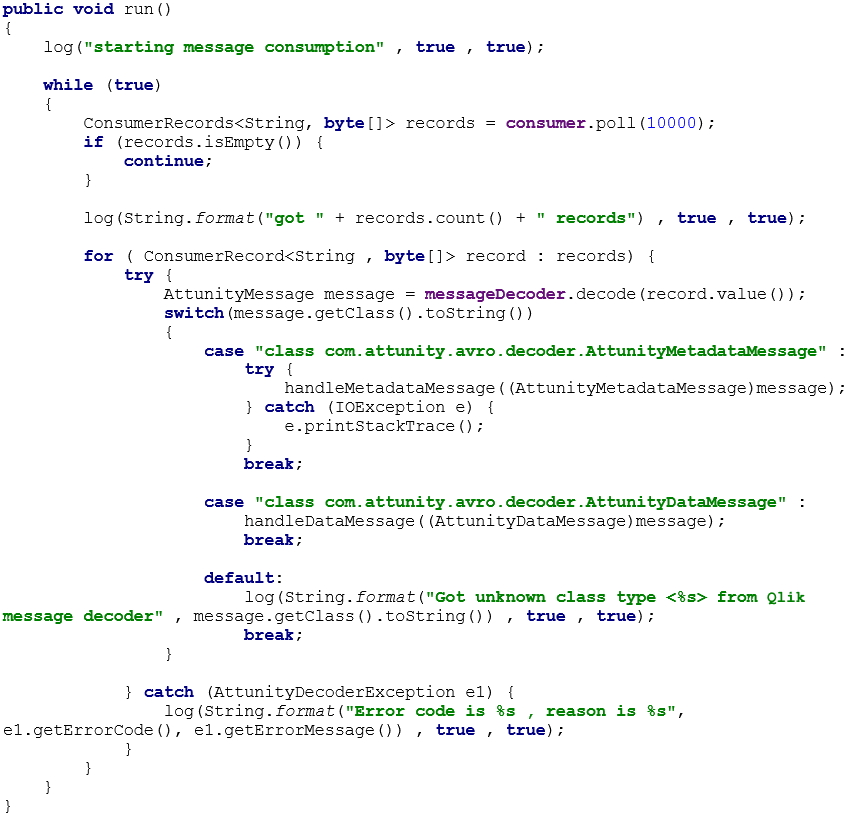
The code follows the following flow:
- A Kafka consumer polls for messages. After the consumer has read the messages, each message is sent to the message decoder for decoding and message type verification.
- If the message is of type
AttunityMetadataMessage, a user-definedhandleMetadataMessagemethod is called with the proper casting on the message. - If the message is of type
AttunityDataMessage, a user-definedhandleDataMessagemethod is called with the proper casting. - If an unknown message class is returned (i.e. the SDK supports more class types than the customer's code), an appropriate message is sent.
- If decoding failed, an appropriate message is also sent, together with the exception details from the decoder.